
 Students Guide
 Introduction
Toprofs.com is a Toptier and innovative platform designed for students and tutors worldwide, combining all 2025-2026 technology and the features you need to learn easily, flexibly, and at the best price.
Unlike other platforms that charge up to €40 per month just for subscriptions and then make you pay extra for each class, at Toprofs you only pay for what you use, with a maximum 6% service fee per class ( 🤯 zero monthly subscriptions!) . This means no hidden costs and you can cancel or reschedule your classes anytime*.
🌟 At Toprofs, we offer a wide range of benefits:
- Enjoy the Free Trial Lessons: Most of our tutors offer a first trial class for free! Don’t hesitate to book your first trial lesson and dive into your learning without any commitment. Our Top Profesors are waiting for you!
- Class Options: Toprofs allows you to book online classes (using our advanced video classroom technology), at-home classes (where the teacher comes to your home), or classes at the teacher’s location (where you attend the lesson at the teacher’s location).
- Freedom to talk to any teachers you’re interested in: We let you take your time to decide which teacher is the best fit for your needs before booking, ensuring a personalized and effective learning experience from the very first class.
- Secure Payments: You never pay the teacher directly. Your money is held securely until you confirm us that the class has been completed.
- Full scheduling flexibility: Change dates* if the class time or day doesn’t suit you.
- Personalized class reports: Request a report from your teacher after each class to track progress.
- IA virtual classrooms: Enjoy video calls with whiteboard, screen sharing, and much more, making learning interactive and engaging.
🤓 Take advantage of this smarter way to study with best way to manage all your lessons in a single tool!
1. Find Tutors around you
Are you looking for a tutor?
Join the best community of tutors and students on Toprofs 🤩
Our platform gives you access to tutors. Tutoring, languages, music, dance, sport... You have plenty to choose from!
To take advantage of it, it's simple:
Go to Toprofs homepage, then add the subject you want to learn and your city in the search engine. All available tutors near you will appear before your eyes!
Or go directly to our "find tutors" page that combines all great algorithms to propose the best teachers for you.
Trusted tutors
At Toprofs, profile verification is essential. Our support teams moderate all accounts registered on the platform. You will find trusted and great tutors who are passionate about teaching!
Refine your search
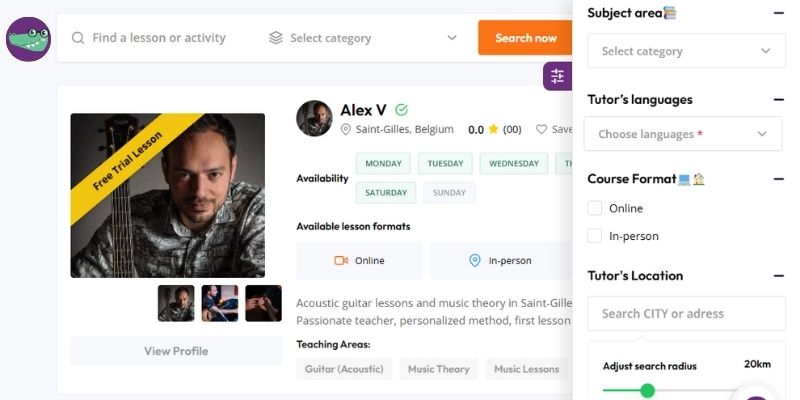
- Filter by Subject
- Filter by Stars (reviews)
- Filter by Languages
- Filter by Course format (online or insite)
- Filter by Availability
- Filter by Tutor's Location
- Filter by radius, price range, gender, ...
2. Chat with Tutors
Once you register on Toprofs.com, you will always have access to the chat and you can talk to as many tutors as you want, with no limits.
The chat on Toprofs is real-time, meaning you can see when a tutor is online and even watch them typing their reply as they write it.
If you send a message while the tutor is offline, don’t worry—they will receive an email notification letting them know you contacted them, and they will get back to you as soon as possible.
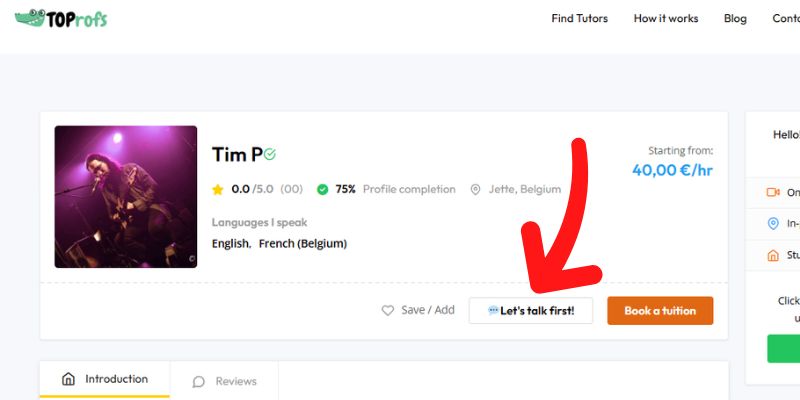
Contacting a tutor is very easy:- 1. Go to the tutor search page: Find Private Tutors
- 2. Choose the tutor profile you want to contact and click "View Profile" .
- 3. Then click the "Let’s talk first" button, and you’ll be taken directly to the chat where you can talk to the tutor and ask all your questions.
3. Chat with Support
There are two ways to contact Toprofs support team:
- 1. Live Chat (the fastest option):
Simply go to your chat section, click on Customer Support, select the agent you want to talk with and start a real-time conversation with our team.
You can also access the chat through your Inbox in your dashboard.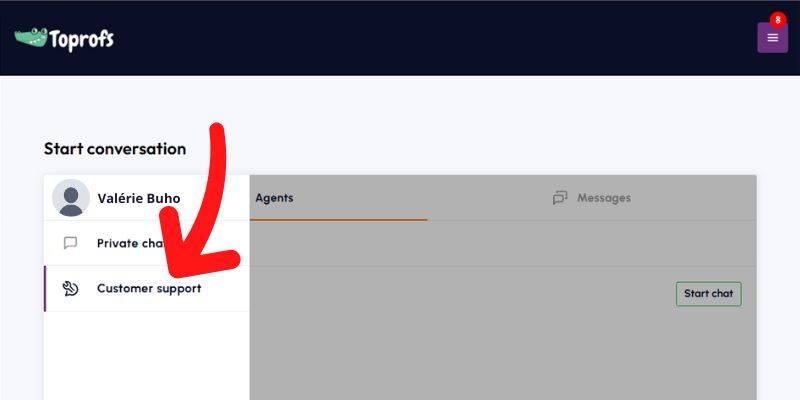
- 2. Email:
You can email us at hi@toprofs.com. We’re always happy to help and we usually reply on the same day.
Get Started!
1. Sign Up
Here’s a clear, step-by-step explanation of the signup process on Toprofs, written for students:
- 1. Go to the Sign-Up page
and fill out the registration form. Name, email, password, country… the usual parade of boxes everyone pretends to read carefully. You can also register directly using your Google account!
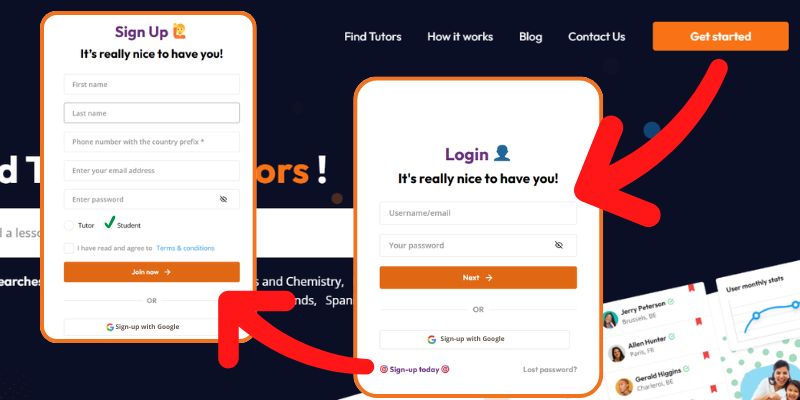
- 2. After submitting the form, you’ll get a verification email. Inside that email, click the link to Verify your email. One small tap and Toprofs universe unlocks for you.
Once your email is verified, you’re all set. You can log in and access everything Toprofs offers: booking lessons, chatting with tutors, and exploring all the lesson formats available. Online classes, lessons at the student’s place, lessons at the tutor’s place… There are more than 2000 subjects and a lots of tutors around the world waiting for you.
2. Your Account
Once your email is verified, you will always have access to your student account, where you can search for tutors across all kinds of subjects, from math, chemistry or engineering lessons, to yoga, and horseback riding, but also classical dance, guitar, or even astrology lessons!
Your student account will not be visible to tutors until you contact them.
Important: If you want to book a class at your home, make sure to save your home address in your account; otherwise, the tutor won’t know where to go.
The menu in your account offers many options, which we explain here:
- 1. My Profile: This section includes all your personal and contact information needed to connect you with tutors and arrange your lessons.
- 2. Favorite Tutors: In this section, you’ll find all the tutors you've bookmarked as favorites. This makes it easy to reconnect with them without having to search again, a personalized list just for you!
- 3. My Lessons Reports: This innovative feature allows you to request a report from your tutors for every lesson you’ve completed. In this section, tutors can also send you homework, files, or any other materials related to the course. We’re the first to offer this exclusive area just for you! (Parents can also request documents, pictures of exercises, test results, and more related to their children’s progress.
- 4. My Bookings: Here you can find all your bookings, organized by the following categories:
- All Status: This shows all your bookings, organized by date.
- Pending Bookings: These are bookings waiting for approval from your tutor. If the booking isn’t confirmed by your tutor before the lesson, don’t worry, you’ll be automatically refunded by the system.
- Ongoing: This list shows your active lessons, as well as any lessons you still need to confirm as completed.
- Completed: This is the list of all your confirmed, completed lessons, so you can keep track of all your details.
- Declined: This section shows all the lessons declined by your tutor, along with the reason provided by the teacher. Note that declined lessons are automatically refunded by the system as soon as they’re declined.
- Cancelled: Here you'll find all the lessons you’ve canceled for any reason.
- 5. View Receipts: Here you can find records of all your transactions. All your receipts in one place, with the option to download them as PDF files!
3. View of Your Profile
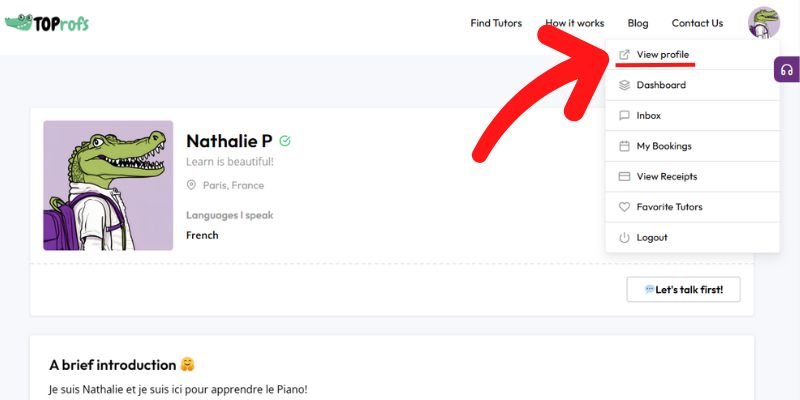
You can see how others view your profile by clicking the “View Profile” option. This lets you preview exactly what they see. Remember that only tutors you have previously contacted have the URL to access your profile.
Secure Bookings
1. How to book a lesson?
When you make a purchase, your payment is securely held by Toprofs through an escrow system. After you do your lesson, you will receive a reminder email asking you to confirm that the class took place. The teacher can only access the payment once you confirm the lesson as completed.
- 1. Go to the “Find Tutors” page : Click here
Our smart algorithm will suggest the best tutors that match your needs and profile.
- 2. Filter and choose your tutor: You can sort and filter tutors using different options such as:
- Subject
- Location
- Price
- Level, availability, and more
When you find a tutor you like, click on “View Profile.”
- 3. Check the tutor’s profile: On the tutor’s profile page, you can see:
- His presentation
- Diplomas and qualifications
- Subjects they teach
- Reviews and ratings from other students, and more
- 4. Click on “Book a tuition” (orange button). Then follow these steps:
- 1️ Search available lessons:
Under the “Search available lessons” option, you can look for free time slots with your chosen tutor.
- 2️ Select the time slots:
Choose the date and time you want. You can book one or multiple slots at the same time (e.g., 10 lessons).
- 3️ Booking for someone else?
If you are booking the class for another person (e.g., your child or spouse), just enter their contact details.
They do not need to be registered on Toprofs, this is only so we can send them the invitation link, confirmation emails, and access to the virtual classroom.
- 4️ Confirm and pay:
Save, continue, and complete the payment. That’s it! Your lesson is officially booked 🎉
- 1️ Search available lessons:
- 5. Tutor approval & refund guarantee: (orange button). Your tutor will confirm the booking as soon as possible.
Don’t worry! if the tutor declines or does not approve your booking, your payment will be automatically refunded to your original payment method , usually within less than a minute!
2. Is safe to book?
When you make a purchase, your payment is securely held by Toprofs through an escrow system. After you do your lesson, you will receive a reminder email asking you to confirm that the class took place. The teacher can only access the payment once you confirm the lesson as completed.
If there is any problem, simply do not confirm the class. You will have 3 days to inform us of the issue, and your money will remain safe while we resolve your case.
If everything went well, you just need to confirm the lesson, and the teacher will immediately receive their payment. If you do not confirm and no incident is reported bu you, the teacher will automatically receive the payment after 3 calendar days.
3. Refund of declined lessons
When you book a lesson and complete the payment, your money is always protected. Here’s how it works:
- If the teacher declines your lesson for any reason, you will receive a full refund automatically. You don’t need to take any action 🌟.
- If the teacher neither confirms nor declines the lesson, and the scheduled day and time arrive, the system will automatically cancel the lesson and you will receive a full refund. You don’t need to take any action 🌟.
- If a lesson has been confirmed by the teacher, but later the teacher cancels it for any reason, you will also receive a full automatic refund. You don’t need to take any action 🌟.
In all cases, your money is completely safe and is never released to the teacher unless the lesson is confirmed and completed 🛡️.
4. Can I edit my bookings?
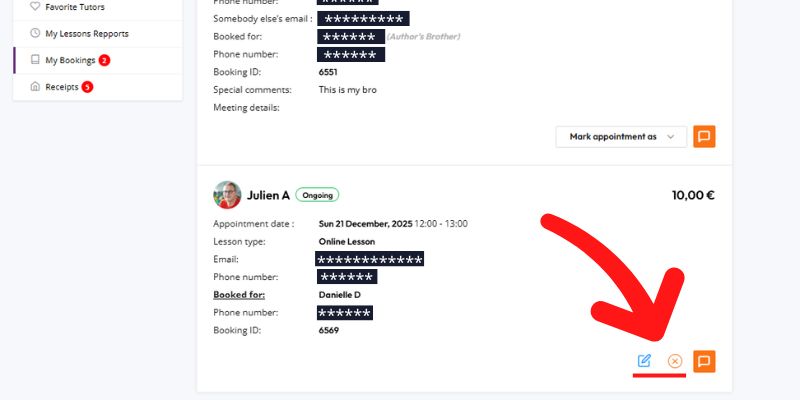
When you book a lesson on Toprofs, you have flexibility in case you need to change the date. If for any reason you cannot attend on the original date, you are entitled to reschedule the lesson up to two times at no extra cost, as long as:
- The new lesson date is within one month from the original date, and
- The teacher is available on the new proposed date.
- You edit/cancel the booking 24h prior to the lesson date/time.
Free Virtual Classrooms
1. How to access a free virtual classroom?
At Toprofs, all classes give you access to our virtual classrooms 😊. These spaces include video calls 📹, chat 💬, a dynamic board, file sharing 📂, a whiteboard ✏️, and many more tools to support your learning.
Keep in mind that access to the virtual classroom is not limited to online classes only. Virtual rooms are also created when you book an in-site class, whether it takes place at your home or at the teacher’s place 🏠👩🏫.
You never know—if at the last minute you can’t attend in person, just let the teacher know and you can both connect online and hold the class in the virtual classroom 💻.
These virtual classrooms can also be used for group classes 👥.
- 1. Go to the Sign-Up page
and fill out the registration form. Name, email, password, country… the usual parade of boxes everyone pretends to read carefully. You can also register directly using your Google account!
- 1. Live Chat (the fastest option):